Claude's New Effort Setting, Explained (For People Who Aren't Coders)
Claude added an effort setting with five levels. Here's what Low, Medium, High, Extra, and Max actually do — and which one to pick — in plain language.


If you opened Claude this week and noticed a new menu next to the model name — the one that says "Effort" with options like Low, Medium, and High — you're not imagining it. It's new, it arrived with Claude Opus 4.8, and almost everything written about it so far is for software developers.
This isn't. If you use Claude to research and write family history, here's what the effort setting actually does, what each level means, and which one to pick. In plain language, no coding required.
Let's clear it up.
What is Claude's effort setting?
The effort setting controls how hard Claude thinks before it answers you.
That's the whole idea. When you raise the effort, Claude takes more time to reason through your request, weigh different approaches, and check its own work before responding. When you lower it, Claude answers faster and more directly.
You're making a trade, on purpose: thoroughness for speed. High effort gives you a more carefully reasoned answer that takes a little longer. Low effort gives you a quick answer that's good enough for simple work.
You'll find it in the Claude app, in the dropdown next to the model name (where it says "Opus 4.8"). Click it, choose Effort, and you'll see the levels.
What do the effort levels mean?
Claude Opus 4.8 gives you five levels. Here's what each one is for, without the jargon.
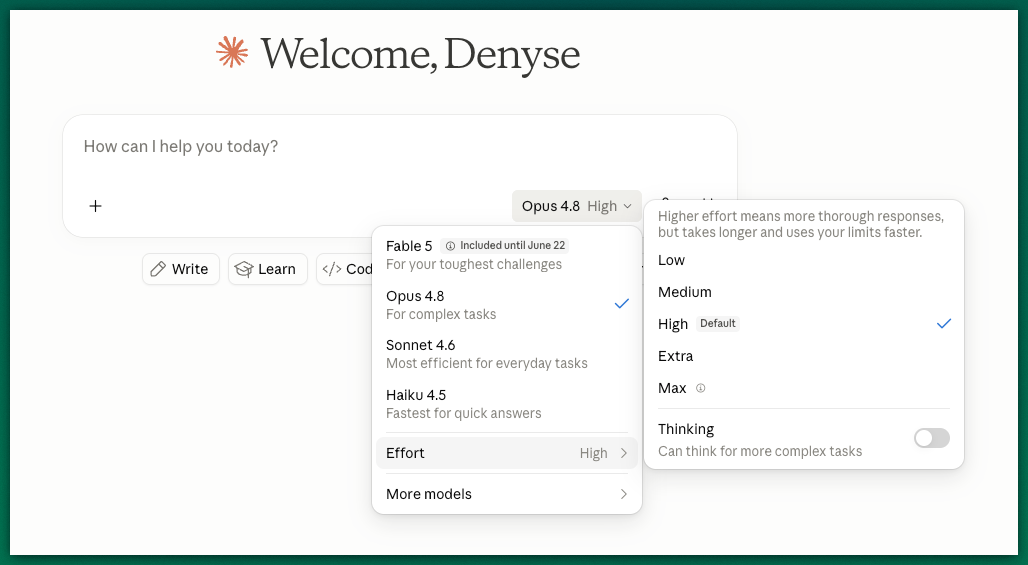
Low — The fastest. Claude answers quickly from what it already knows, without much deliberation. Good for simple, quick tasks.
Medium — A balanced middle. Claude does real thinking but doesn't labor over it. A safe choice for most everyday work.
High — The default, and the one you're already using unless you change it. Claude reasons carefully and thoroughly. This is the right setting for work that matters.
Extra — More thinking than High, for harder problems that need real working-through.
Max — The most thorough setting. Claude explores every angle and takes as long as it needs. Reserve this for genuinely difficult problems where you want its absolute best.
You'll also see an Adaptive thinking toggle. That simply lets Claude decide how hard to think based on how complex your request is, so you don't have to choose at all.
Which effort level should I pick?
Here's the honest answer first: if you're not sure, leave it on the default (High) or drop to Medium. You don't need to fuss with this to get good results.
That's the truth. The default is already strong. The dial is there for when you want to fine-tune, not a hoop you have to jump through.
When you do want to choose, use one simple rule: match the thinking to the stakes.
When being wrong would cost you, give Claude room to think. When you just need speed and you'll react to whatever comes back anyway, let it move fast.
Use High, Extra, or Max for:
- Reviewing a draft you intend to publish
- Working through a tricky research problem or a conflict between two sources
- Writing a passage where the tone has to be exactly right
- Anything that will carry your name
Use Low or Medium for:
- Brainstorming a list of ideas, angles, or titles
- Cleaning up a transcription or reformatting notes
- Quick questions and simple lookups
- First-pass drafts you already plan to rewrite yourself
The mistake to avoid is the reverse: rushing the work that matters and laboring over the work that doesn't. A draft review deserves Claude's full attention. A list of ten possible titles does not.
You don't even need the menu
Here's a trick that works no matter which version of Claude you're using. You can ask for more thinking with words.
When a task matters, just tell Claude so at the start: "This is a final draft I want to publish. Take your time and think it through before you respond."
That single sentence does the same job as turning the dial up. It's the easiest way to get Claude's careful attention on the work that deserves it.
What else changed in Claude Opus 4.8?
The effort setting is the visible change, but the one that matters most for writers is not as obvious: Claude now holds your instructions and context better across a long working session.
If you've ever spent an hour drafting with Claude and watched it slowly forget your ancestor's name, drift from the tone you asked for, or make you re-explain your sources, that's the friction this version reduces. Longer sessions hold their thread. Your voice direction sticks. The setup you do at the start keeps working as you go.
You don't have to do anything to get it. If you use Claude, you're already on the new version.
The bottom line
The effort setting sounds technical, but it comes down to one choice: how hard do you want Claude to think about this?
Leave it on High for the work that matters. Drop to Medium when you want speed. And if you're ever unsure, the default is already a good answer.
That's all there is to it. Now go finish a story.