ChatGPT for Genealogy: How to Use OpenAI's AI for Family History Research
ChatGPT for genealogy: what it does well, where it falls short, and how to set it up for family history research in under 30 minutes.

ChatGPT is the AI tool most genealogists try first. It's the one friends mention at society meetings. It's the one that shows up in conference handouts. For many family historians, ChatGPT is the first AI conversation they ever have.
That makes it important to understand what it does well and where it falls short for genealogy work.
What ChatGPT actually is
ChatGPT is the AI assistant made by OpenAI. It runs at chatgpt.com in your browser and inside a mobile app. The current flagship model is GPT-5. OpenAI also offers an image generator (DALL-E), web browsing, and file analysis built into the same interface.
The free version gives you access to a limited model with daily usage caps. ChatGPT paid subscription unlocks the full GPT-5 model, longer conversations, Custom GPTs, and higher priority when the system is busy.
For family historians testing AI for the first time, the free tier is enough to see whether AI is useful for your research. You can decide about a paid plan after you've used it on your own records.
Three things ChatGPT is genuinely good at for genealogy
Quick historical context
You're looking at a probate record from 1843 and you need to understand what "dower right" meant in antebellum Pennsylvania law. ChatGPT gives you a clear, readable explanation in seconds. Not a legal treatise — a plain English answer that helps you understand what the record is telling you.
This is ChatGPT's sweet spot for genealogy: answering factual questions about historical context, legal terms, occupations, place names, and record-keeping practices. It's fast, it's conversational, and the answers are usually accurate for well-documented historical topics.
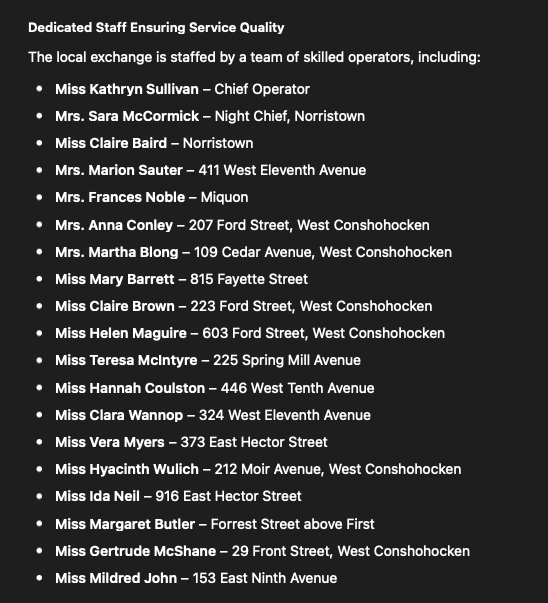
I love to use it to help me understand information I'm reading that is jumbled together. For example, I found a newspaper article listing my grandmother as one of the Bell Telephone Operators who were just hired for the new exchange. However the list of women was arranged across three columns and two pages. So I gave the article to ChatGPT and asked for an organized list. Now I have an easy to read FAN Club list and it took me two minutes, rather than two hours of typing it myself.
Building Custom GPTs for repeatable tasks
Custom GPTs are pre-configured assistants you build once and reuse. You define the instructions, upload reference files, and give it a name. Every time you open that Custom GPT, it already knows what to do.
For genealogy, this means you can build a Census Decoder GPT loaded with enumerator instructions, a Citation Formatter GPT that follows Evidence Explained standards, or a Research Planner GPT that asks you the right questions about an ancestor before suggesting next steps.
The setup takes about 30 minutes per Custom GPT. Once built, you use it for months.
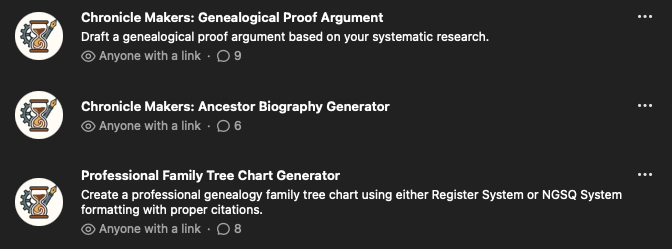
Here are three Custom GPTs I built for the Chronicle Makers community all based around common research tasks: writing proof arguments, writing biographies, and creating family tree charts in NGSQ or Register style.
Brainstorming and breaking stuckness
When you don't know what to do next with your research, ChatGPT is a useful brainstorming partner. Describe what you know about an ancestor, what records you've found, and where you're stuck. ChatGPT will suggest record types you haven't tried, alternate spellings you haven't searched, and angles you haven't considered.
The suggestions aren't always correct — you verify every one. But the act of having a conversation about your brick wall often loosens the problem in ways that sitting alone with your files does not.
Three things to be careful about with ChatGPT
1.It confabulates confidently
ChatGPT will sometimes invent records, create fictional ancestors, or cite sources that don't exist. The output reads as authoritative even when it's wrong. In genealogy work, where accuracy is everything, this matters more than in casual use.
The rule is simple: never add anything from ChatGPT to your family tree without verifying it against an original source. Treat every factual claim as a hypothesis, not a conclusion.
2.The conversation resets every time
Unlike Claude's Projects feature, ChatGPT conversations don't carry memory between sessions by default. Every new chat starts from zero. You can enable Memory in settings, which helps ChatGPT remember facts across conversations, but it's not the same as a dedicated project workspace that holds your research files in context.
Custom GPTs partially solve this by keeping instructions persistent. But you still need to re-upload or reference your specific documents in each conversation.
3.Image analysis is improving but still limited for genealogy
ChatGPT can read some handwritten documents, but its accuracy on historical handwriting — particularly pre-1850 cursive, German script, or faded ink — is lower than Claude or Gemini. If reading old handwriting is your primary need, test ChatGPT on a sample before committing to a full transcription workflow.
The under-30-minute setup for genealogy
Step 1: Sign up at chatgpt.com. The free version is fine for testing. If you decide to continue, ChatGPT Plus is $20 a month.
Step 2: Check your privacy settings. Settings → Data controls → review what's turned on. If you don't want your conversations used for model training, turn off the training toggle.
Step 3: Try a historical context question first. Type something specific to your research: "What was the inheritance law in Chester County, Pennsylvania in 1795 when there was no will?" See how the response compares to what you already know.
Step 4: Upload a document. A scanned deed, a census page, a photograph of a family Bible page. Ask ChatGPT to transcribe it or summarize what it says. Compare the result against the original.
Step 5: Build your first Custom GPT. Click "Explore GPTs" → "Create." Give it a name, a set of instructions for one specific task, and any reference files it needs. Start simple — a census reading assistant or a research question generator.
Step 6: Verify everything. Same rule as every AI tool. Check every date, every name, every citation against original sources before trusting it.
When to use ChatGPT vs. another AI tool
ChatGPT is the right tool for quick questions, historical context, brainstorming research strategies, and building Custom GPTs for repeatable tasks. It has the lowest barrier to entry of any AI tool and the strongest free tier.
Claude is stronger for long-context research sessions, writing family narratives, and any project where you want the AI to hold your entire research file in memory. Gemini is better for reading complex document layouts. Perplexity is better when you need cited sources from across the web.
If ChatGPT is the only AI tool you've used, you have a solid foundation. The prompting skills you've built transfer directly to Claude, Gemini, and Perplexity. Don't think of it of starting over, think of it as expanding.