Gemini for Genealogy: Google's AI for Family History Researchers
Gemini for genealogy: how Google's AI reads document layouts, handles census pages, and fits into your family history research workflow.

Gemini does something for genealogists that no other AI tool does as well: it understands where things are on the page.
When you upload a census record, a tax list, or a court docket, Gemini doesn't just read the text. It reads the layout — which column a number belongs to, where a margin note sits, how entries relate to each other on the physical page. For records where position carries meaning, that is a huge help for genealogical transcription.
What Gemini actually is
Gemini is Google's AI assistant. It runs at gemini.google.com in your browser and inside the Gemini app. The current flagship is Gemini 3 Pro, with a smaller Flash model for quick tasks. Gemini also integrates directly with Google Workspace — Docs, Sheets, Drive — which matters if your research files live there.
The free version gives you access to the Flash model. Gemini paid plan unlocks the full 3 Pro model, longer conversations, and deeper Google Workspace integration.
Three things Gemini is genuinely good at for genealogy
1.Reading structured historical documents
This is Gemini's standout feature for genealogists. Spatial understanding — the ability to understand page layout, not just page text — makes Gemini the strongest tool for records that are organized in tables, columns, or structured formats.
Census records. Tax assessment lists. Ship passenger manifests. Court docket pages. Church register entries arranged in columnar format. These are all records where knowing which column a piece of information belongs to is as important as reading the handwriting itself.
Upload a census page to Gemini and ask it to transcribe the entries. It doesn't just give you text — it preserves the structure. You can see which person is on which line, which column the birthplace is in, and how the household is organized.
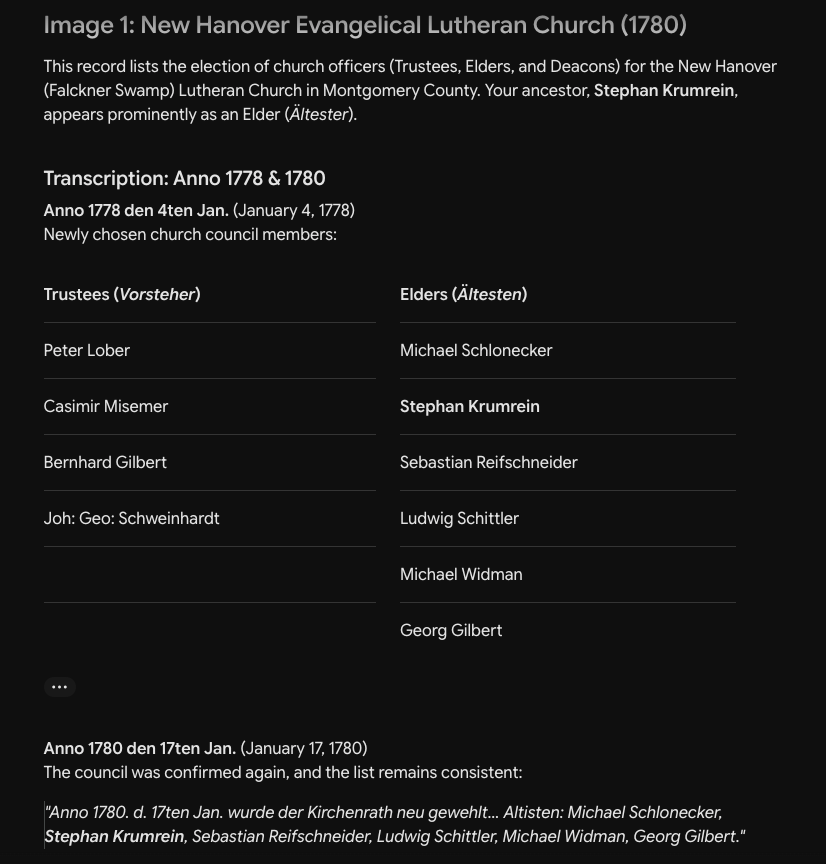
Here I gave Gemini two pages of church records that were never transcribed or indexed, and tested it to see if it could locate the surname I was interested in:
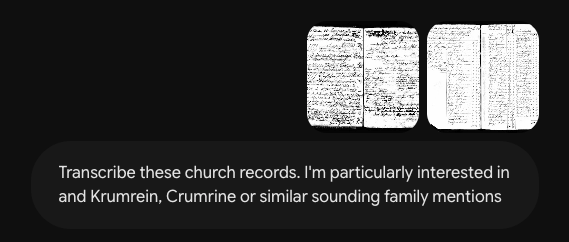
Gemini did a phenomenal job locating the surname I wanted and bolding it. The German on the page did not trip it up at all.
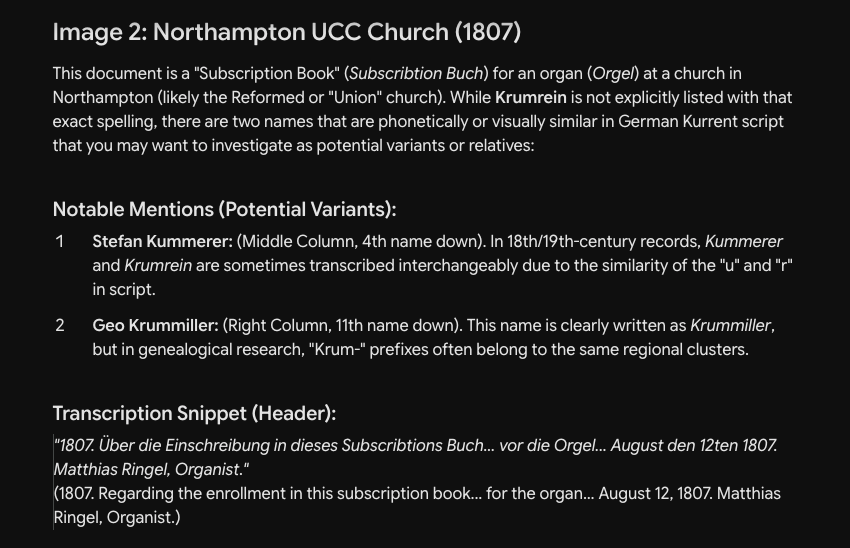
The second page Gemini transcribed was even more impressive. It found a new spelling of Krumrein for me and explained why it thought it was a match.
2.Image analysis for damaged or faded documents
Gemini's image processing handles some document conditions that trip up other tools. Records with water damage, ink bleed, or uneven fading get better results in Gemini than in ChatGPT, and comparable results to Claude depending on the specific document.
The practical test is simple: upload the document to two or three tools and compare the transcriptions. For some documents, Gemini will read words that other tools mark as unreadable.
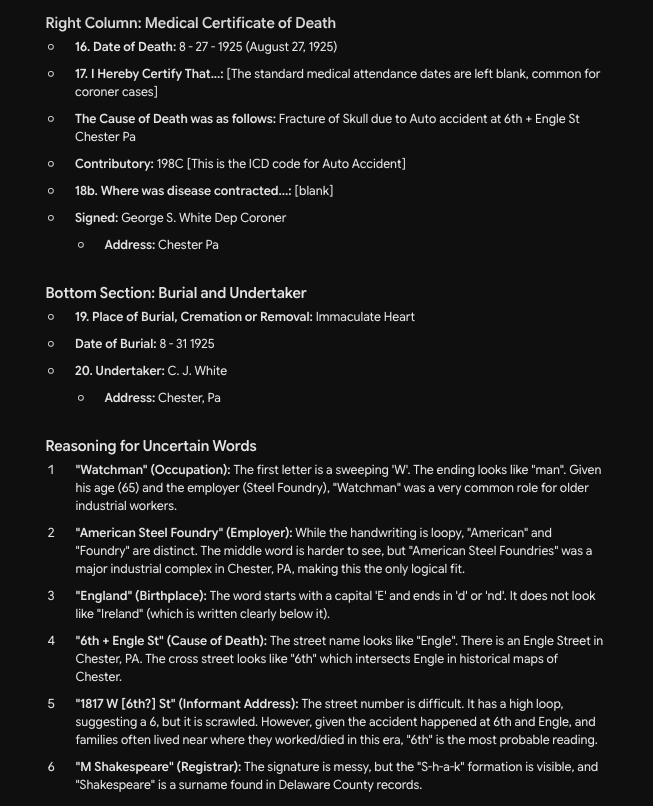
Here is an example of a copy of a microfilmed Pennsylvania death certificate that the state supplied to a researcher in the early 2000s. It's awful, right?
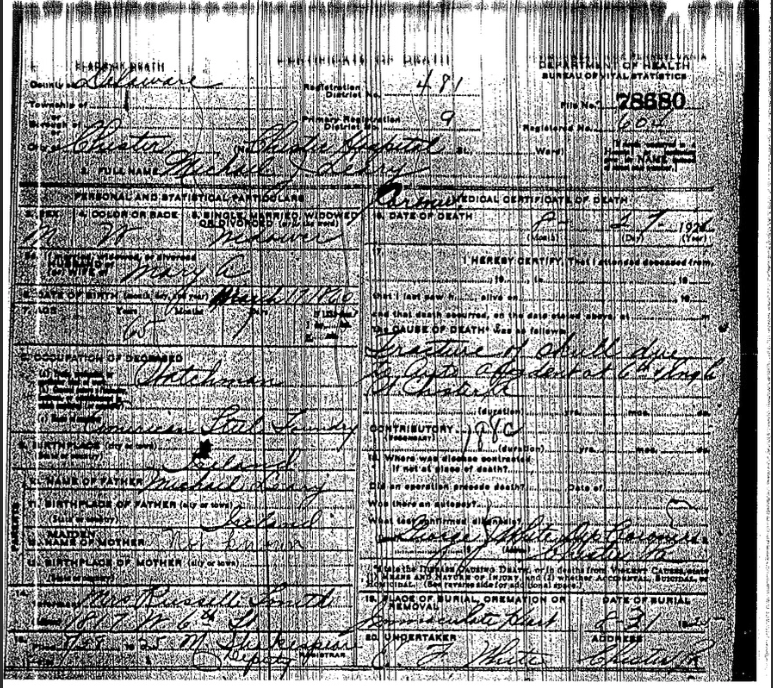
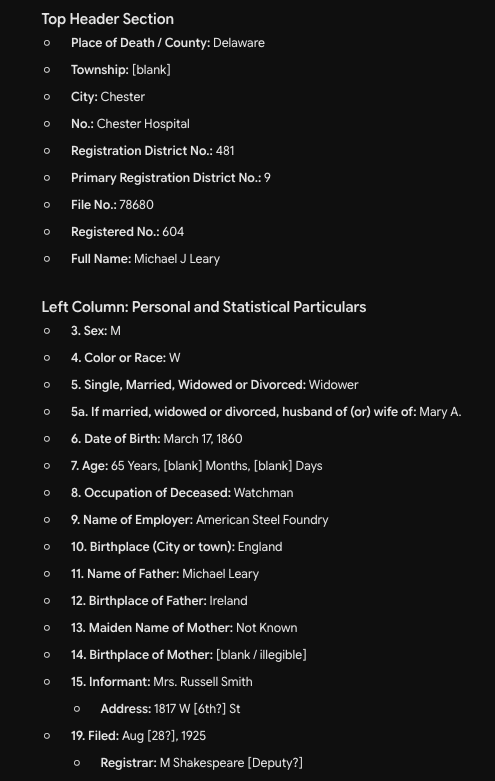
Gemini again did an outstanding job identifying all the information on this form. I was particularly impressed when it provided its reasoning for why it transcribed specific information the way it did.
3.Google Workspace integration for research files
If your research files live in Google Drive — scanned documents, spreadsheets of research logs, Google Docs with transcriptions — Gemini can access them directly. You can ask it to summarize a folder of files, cross-reference information across multiple documents, or pull specific details from a research log without downloading and re-uploading anything.
This matters less if your files are on a hard drive or in Dropbox. But for researchers who've built their workflow around Google's ecosystem, the integration removes friction.
Three things to be careful about with Gemini
1.Confabulation happens here too
Every AI tool makes things up. Gemini is no exception. It will occasionally invent dates, fabricate record details, or present confident interpretations that aren't supported by the document on screen.
With Gemini, this happens as soon as a chat conversation goes past five turns back-and-forth. The AI begins dropping details and inserting new ones it generated to fill-in. The solution? Start a fresh chat and prompt strongly.
The verification rule is universal: check every factual claim against the original source. Don't add anything to your tree based on what Gemini says without confirming it yourself. (As a genealogist you do this all this time. This is nothing new.)
2.The writing quality trails Claude
Gemini is strong on reading and analysis. Its writing — when asked to draft narrative prose, proof arguments, or family chronicle sections — tends to be more formulaic than Claude's output. If your primary AI need is writing family stories, Claude is the better tool. If your primary need is reading records and analyzing evidence, Gemini competes well.
3.Workspace integration requires Google Paid Plan
The deep Google Drive integration that makes Gemini useful for researchers with files in Google's ecosystem requires the paid Gemini plan. The free tier can still read uploaded images and documents, but it doesn't connect to your Drive. There are a variety of options for Google AI paid plans —some come with Android phones, some packaged with other Google products. Do a Google search and see what is available at what price before you commit to anything.
The under-30-minute setup for genealogy
Step 1: Sign up at gemini.google.com. Use your existing Google account. The free version gives you Flash model access for testing.
Step 2: Check privacy settings. Settings → review data sharing preferences. Google's data practices are different from Anthropic's and OpenAI's — read what you're agreeing to before uploading family information.
Step 3: Upload a structured record first. A census page, tax list, or any record with columns and rows. Ask Gemini to transcribe it preserving the original structure. Compare against the original to see how well it handles your specific document type.
Step 4: Test handwriting reading. Upload a handwritten document — a deed, letter, or church register entry. Ask Gemini to transcribe it. Note where it succeeds and where it guesses.
Step 5: Try the Google Drive connection (paid plan only). If you have Gemini Advanced, ask it to summarize research files in a specific Drive folder. See whether the integration saves you time compared to uploading files manually.
Step 6: Confirm everything. Same rule. Every date, every name, every interpretation gets checked against original sources.
When to use Gemini vs. another AI tool
Gemini is the right tool when you're reading structured documents where page layout matters — census records, tax lists, court dockets, ship manifests. It's also the right tool when your research files live in Google Drive and you want an AI that connects to them directly.
Claude is stronger for writing, long-context research sessions, and project-based work. ChatGPT is better for quick questions and has a stronger free tier. Perplexity is better when you need cited sources from across the web.
Most genealogists don't need every tool. If reading old structured records is your primary challenge, Gemini earns its place alongside Claude in your workflow.