Claude for Genealogy: The Researcher's Guide to Anthropic's AI
Claude for genealogy: how to use Anthropic's AI for reading old records, building proof arguments, and writing family history stories.
Claude is the AI most family historians end up using once they try it.
The other tools are excellent at specific things. Claude is the one researchers stay with for the work that matters most — building research arguments, and writing the family stories the records support.
This guide is what I tell people who ask me where to start with Claude.
What Claude actually is
Claude is the LLM, AI assistant made by Anthropic. It runs at claude.ai in your browser and inside an app on your phone. The current flagship model is Claude Opus 4.7, and Sonnet 4.6 model specializing in writing, and a Haiku model for quick tasks.
You type a question or paste a document. Claude reads it and responds in conversation. It can read images, transcribe handwriting, summarize long records, draft research plans, and write narrative prose in your voice.
The free version gives you access to a smaller model with daily message limits. The paid Claude Pro plan ($20 a month) unlocks Opus 4.7, Custom Skills, Claude Cowork, Claude Code, longer message limits, and the Projects workspace.
For most family historians, a paid Claude subscription is worth the cost within the first week.
Three things Claude is genuinely good at for genealogy
1.Comparing historical records
Claude reads cursive handwriting on old documents and puts them into comparison charts in minutes. Tasks like this used to take me a whole day. I gave it 11 tax records and it transcribed them then laid them out in a table so I could see the changes across time. This kind of analysis —download images, transcribe the records, arrange information in formatted table — would take me an entire day to set up and do before AI.
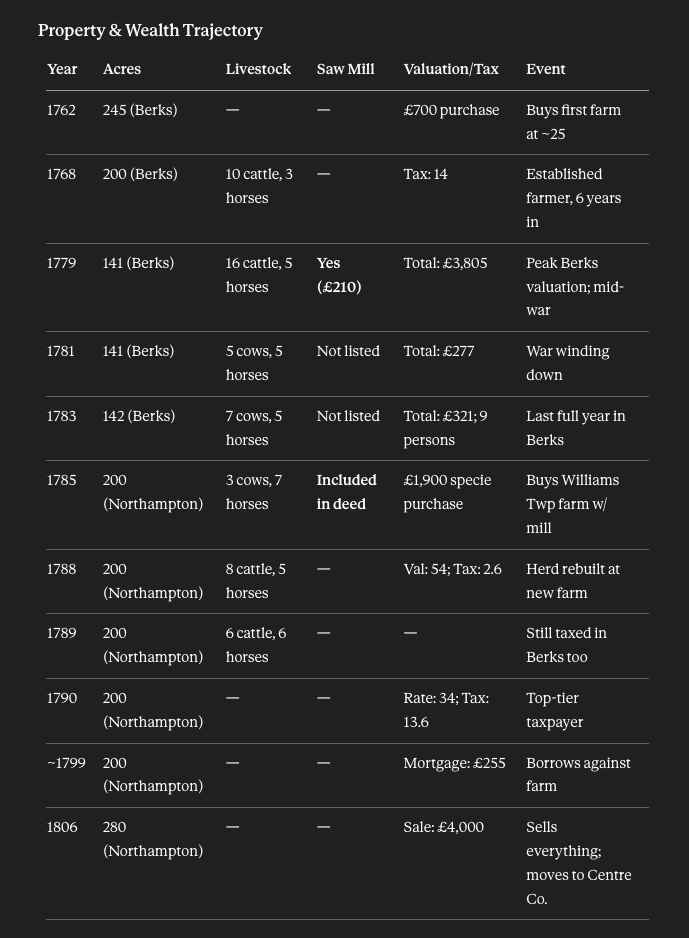
What this changes: hours of squinting at faded ink turn into minutes. You still verify every name and date — that part of the work does not go away. But the slow translation from cursive to readable text is no longer the bottleneck.
2.Building proof arguments from scattered evidence
Claude is good at the genealogist's hardest task. You have ten records that mention three people who might be the same person. You suspect a parent-child link based on land patterns and witness names. You need to lay out the evidence cleanly and write the conclusion.
Paste your sources into Claude. Ask it to identify the connections and gaps. Claude will surface what you missed, organize the timeline, and draft the proof argument in clear prose.
Here's a research plan I created with Claude for my Revolutionary War ancestor Stephen Crumrine for one (of many!) questions about his life. It organized what I had to prove Stephen's death date and surfaced the existing conflict.
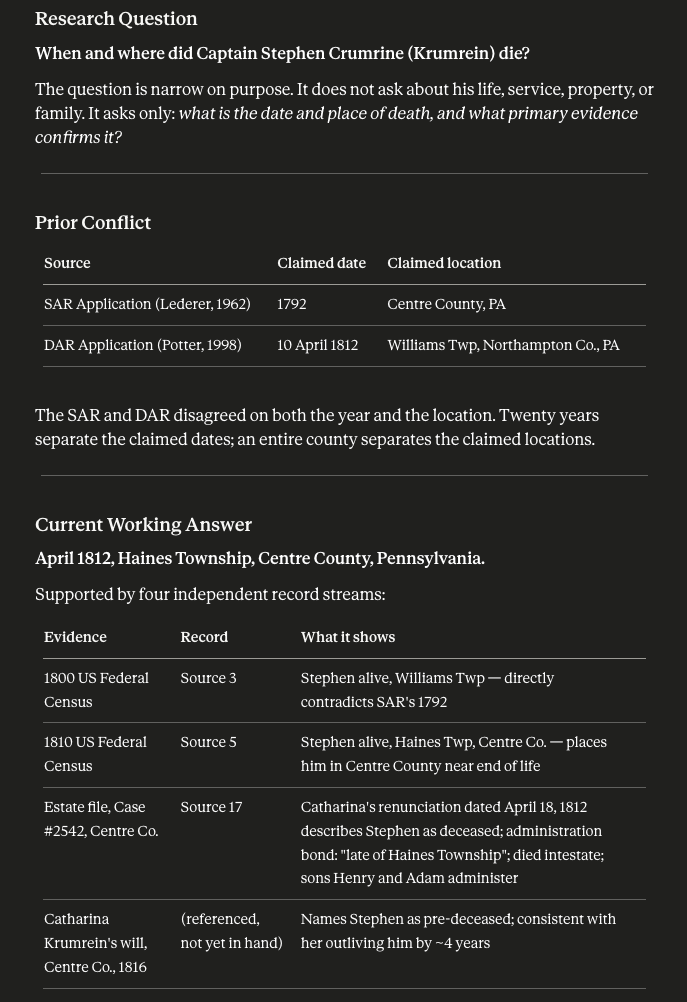
You check every source. You decide what the conclusion is. Claude does the structural work that takes hours and produces something you can read and refine.
3.Writing the family story the records support
This is what Claude does that no other tool does as well. Once you have the proof argument and the source notes, Claude can draft a chronicle in your voice — not a generic AI essay.
You teach it your voice by feeding it examples of your existing writing. You give it the research summary and the scope of the story. Claude drafts a narrative grounded in evidence with the rhythm of how you actually write.
The first draft is scaffolding. You rewrite every sentence in your own voice. The point is not that Claude writes the chronicle for you. The point is that you stop facing a blank page and start with structure you can shape.
Three things to be careful about with Claude
1.It trains on your data by default now
In September 2025, Anthropic changed its default settings. Claude now uses your conversations to train future models unless you explicitly turn that off.
Go to Settings → Privacy → uncheck the data training option. Do this on day one before you upload any sensitive family information or DNA data.
If you want to use Claude for a one-off conversation without it being saved to your history, use Incognito mode. Click the icon next to your prompt input and the chat will not be stored.
2.Message limits hit faster than you expect
Even on Claude paid plans, the daily limits are real. A long research session uploading multiple documents, asking follow-up questions, and iterating on a draft can hit the cap by mid-afternoon.
The workaround is to break long projects into separate Projects (Claude's workspace feature). Each Project keeps its own context. You can return to it without re-uploading the source files.
3.The response sounds good no matter if it's right or wrong
Claude assembles information in tenths of a second and with speed can come mistakes. All LLMs are known to insert information to something that makes sense, but is not correct. In my experience when confronted, Claude immediately rechecks and self-corrects which increases my confidence in the long run.
The verification step is yours. Every citation needs a source check. Every date needs a record confirmation. Claude is the research partner who never sleeps — not the authority who is always right.
The under-30-minute setup for genealogy
This is the workflow I use myself and recommend to every Chronicle Makers member starting with Claude.
Step 1: Sign up for Claude Pro at claude.ai. Use the email address you check daily. The free version is fine for testing but does not give you the Opus 4.7 model that handles serious genealogy work.
Step 2: Turn off data training. Settings → Privacy → uncheck the "Help improve Claude" option. Do this before uploading any family information.
Step 3: Create your first Project. Click "Projects" in the sidebar. Name it for the research problem you want to work on first — Crumrine Family Pennsylvania or Wilmer Dairy Farm Bankruptcy, whatever your current focus is.
Step 4: Upload your source documents to the Project. PDFs of records, photos of documents, your existing research notes. Claude reads them and keeps them in context for every conversation in that Project.
Step 5: Start with a clear question. Not "tell me about my ancestor." Ask something specific: "Based on these three records, what is the strongest evidence that John and James are brothers?" or "Transcribe this 1820 land deed and flag any words you cannot read with confidence."
Step 6: Check each source cited (like you always have). Every name. Every date. Every citation. Claude is helpful when you treat it as a research partner, not as an authority.
When to use Claude vs. another AI tool
Claude is the right tool for assembling timelines, proof arguments, narrative writing, and any task where you need a partner that holds long context across a conversation.
ChatGPT is faster for quick lookups and has stronger image generation if you need it. Gemini has better spatial grounding for reading and transcribing complex historical document layouts. Perplexity is the right tool when you need cited sources from across the web.
For most family historians most of the time, Claude is the daily driver. The other tools are specialists.
If you are starting from zero and can only learn one AI for your genealogy work, learn Claude first. The skills transfer to every other tool. The workflow patterns — Projects, careful verification, voice-matched writing — are the foundation of using AI well.